Wallarm Connector for IBM API Connect
IBM API Connect is a full lifecycle API management solution that includes tools for creating, securing, managing, and monitoring APIs. Wallarm can be used as a connector to protect APIs managed through IBM API Connect by inspecting API traffic and mitigating malicious requests.
To integrate Wallarm with IBM API Connect, deploy a Wallarm node externally and configure IBM API Gateway to proxy traffic to the node for inspection.
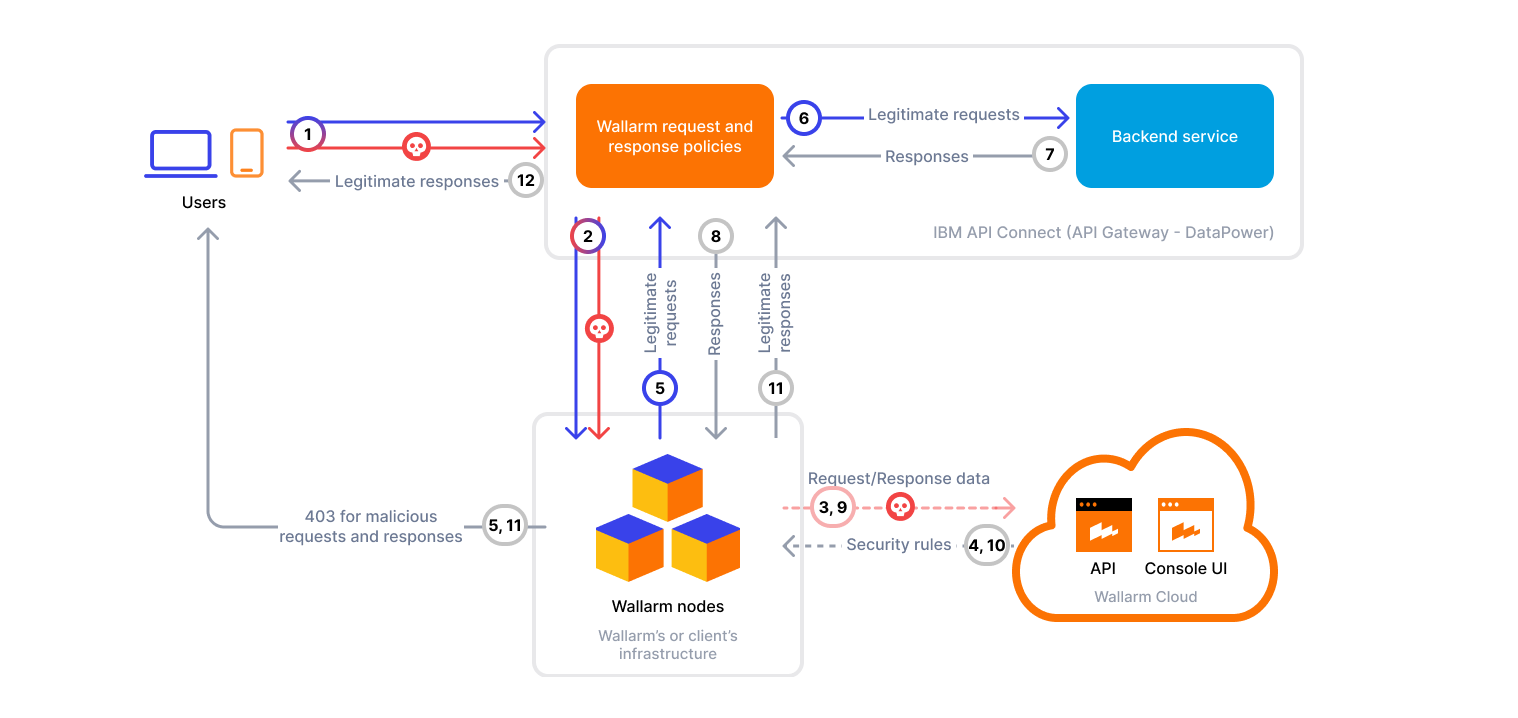
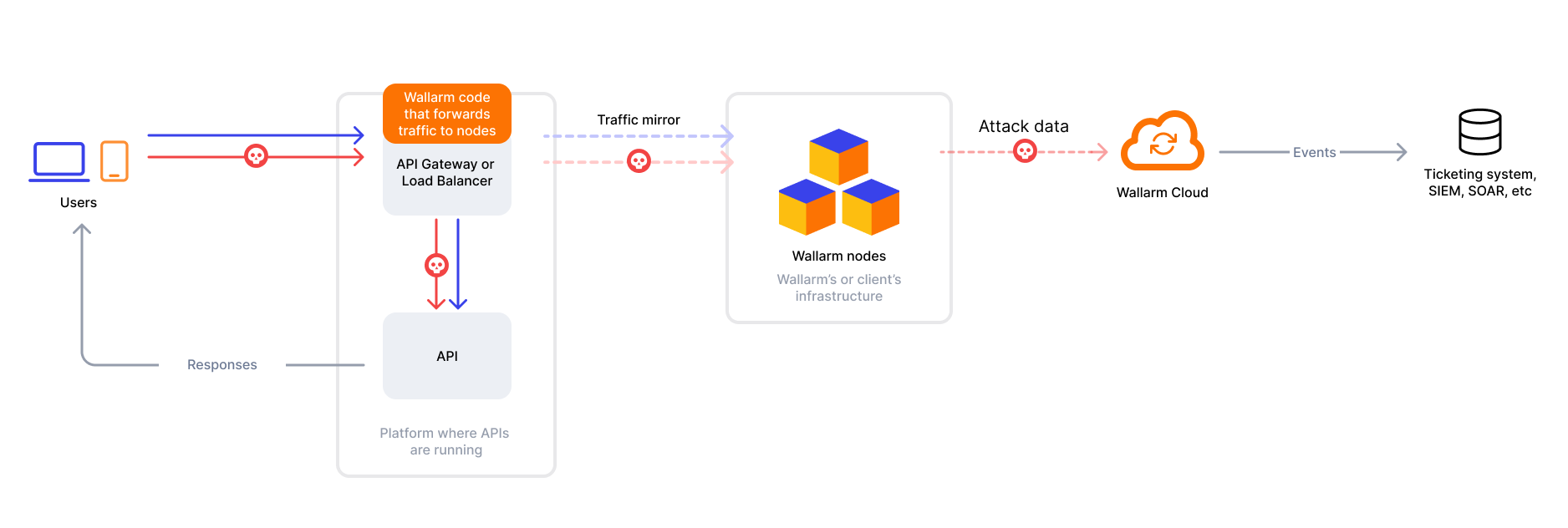
The Wallarm connector for IBM API Connect supports both in-line (blocking) and monitoring (out-of-band) traffic analysis. You select the mode per policy with the failSafeBlock property (see Traffic modes):
In in-line (blocking) mode (failSafeBlock: true, default), the policy sends each request and response to the Wallarm Node and waits for the verdict. Based on the Node filtration mode, malicious requests can be blocked with 403, providing real-time threat mitigation.
In monitoring (out-of-band) mode (failSafeBlock: false), traffic is mirrored to the Wallarm Node fire-and-forget without affecting the original flow. Malicious requests are logged in Wallarm Console but never blocked.
Requests matching API specification
According to IBM API Connect behavior, only requests matching the defined OpenAPI paths will be inspected by the Wallarm Node.
Traffic modes
Both Wallarm policies (wallarm_pre for requests and wallarm_post for responses) run in one of two modes, selected by the failSafeBlock property. Set the same value on both policies.
| In-line (blocking) | Monitoring (out-of-band) | |
|---|---|---|
failSafeBlock value |
true (default) |
false |
| Connector mode | block |
oob |
| Analysis | Synchronous — the policy waits for the Node verdict before the request or response proceeds | Asynchronous — the request or response copy is sent to the Node fire-and-forget |
| Malicious traffic | Can be blocked with 403, depending on the Node filtration mode |
Logged in Wallarm Console, never blocked |
| Node unavailable or error | Request or response is blocked with 500 — protection fails closed |
Logged and ignored, traffic proceeds — fails open |
| Added latency cap | Up to 60 seconds | Up to 3 seconds |
Use cases
This solution is recommended for securing APIs published via IBM API Connect.
Limitations
-
When deploying the Wallarm service with the
LoadBalancertype using the Helm chart, a trusted SSL/TLS certificate is required for the domain. Self-signed certificates are not yet supported. -
Custom blocking page and blocking code configurations are not yet supported.
All blocked malicious traffic is returned with status code
403and the default block page. -
Rate limiting by Wallarm rules is not supported.
Rate limiting cannot be enforced on the Wallarm side for this connector. If you need rate limiting, use the features built into your API gateway or cloud platform.
-
Multitenancy is not supported on Security Edge hosting, but it is supported for a self-hosted node deployed with the connector.
Requirements
To proceed with the deployment, ensure that the following requirements are met:
-
Familiarity with IBM API Connect and IBM DataPower Gateway.
-
An IBM API Connect environment up and running (either local or cloud-managed).
-
A published API in IBM API Connect.
-
IBM API Toolkit installed for command-line interaction (
apicorapic-slim). -
Access to the account with the Administrator role in Wallarm Console for the US Cloud or EU Cloud, or ME Cloud.
-
Wallarm Node of version 0.13.3 or later in the 0.13.x series, or version 0.14.1 or later.
Deployment
1. Deploy a Wallarm node
The Wallarm node is a core component of the Wallarm platform that you need to deploy. It inspects incoming traffic, detects malicious activities, and can be configured to mitigate threats.
You can deploy it either hosted by Wallarm or in your own infrastructure, depending on the level of control you require.
Required Wallarm Node version
The IBM API Connect integration requires Wallarm Node version 0.13.3 or later in the 0.13.x series, or 0.14.1 or later. Older versions do not support this connector.
To deploy a Wallarm-hosted node for the connector, follow the instructions.
Choose an artifact for a self-hosted node deployment and follow the attached instructions:
- All-in-one installer for Linux infrastructures on bare metal or VMs
- Docker image for environments that use containerized deployments
- Helm chart for infrastructures utilizing Kubernetes
2. Obtain and apply the Wallarm policies to APIs in IBM API Connect
Wallarm provides custom policies that can be attached to APIs in API Connect. These policies proxy API requests and responses through the Wallarm Node for inspection and threat detection.
-
Proceed to Wallarm Console → Security Edge → Connectors → Download code bundle and download a code bundle for your platform.
If running a self-hosted node, contact sales@wallarm.com to get the code bundle.
-
Register the request inspection policy:
-
Register the response inspection policy:
In most cases, the configured-gateway-service name is datapower-api-gateway.
3. Integrate Wallarm inspection steps into the assembly pipeline
In your API specification, within the x-ibm-configuration.assembly.execute section, add or update the following steps to route traffic through the Wallarm Node:
-
Before the
invokestep, add thewallarm_prestep to proxy incoming requests to the Wallarm Node. -
Ensure that the
invokestep is configured as follows:- The
target-urlshould follow the format$(target-url)$(request.path)?$(request.query-string). This ensures that requests are proxied to the original backend path along with any query parameters. header-controlandparameter-controlallow all headers and parameters to pass through. This enables the Wallarm Node to analyze the full request, detect attacks in any part of it, and accurately build the API inventory.
- The
-
After the
invokestep, add thewallarm_poststep to proxy responses to the Wallarm Node for inspection.
...
x-ibm-configuration:
  properties:
    target-url:
      value: <BACKEND_ADDRESS>
  ...
  assembly:
    execute:
      - wallarm_pre:
          version: 1.0.2
          title: wallarm_pre
          wallarmNodeAddress: <WALLARM_NODE_URL>
          failSafeBlock: true   # false = monitoring (out-of-band) mode
      - invoke:
          title: invoke
          version: 2.0.0
          verb: keep
          target-url: $(target-url)$(request.path)?$(request.query-string)
          persistent-connection: true
      - wallarm_post:
          version: 1.0.2
          title: wallarm_post
          wallarmNodeAddress: <WALLARM_NODE_URL>
          failSafeBlock: true   # false = monitoring (out-of-band) mode
...
Supported properties in Wallarm policies:
| Parameter | Step name | Description | Required? |
|---|---|---|---|
wallarmNodeAddress |
wallarm_pre, wallarm_post |
Wallarm Node instance URL. | Yes |
failSafeBlock |
wallarm_pre, wallarm_post |
Selects the traffic mode. true (default) — in-line (blocking) mode: traffic is analyzed synchronously and can be blocked, and the request or response is blocked if the Wallarm Node is unavailable or returns an error. false — monitoring (out-of-band) mode: traffic is mirrored to the Node fire-and-forget and never blocked. |
No |
To run the policies in monitoring (out-of-band) mode, set failSafeBlock: false on both the wallarm_pre and wallarm_post steps.
4. Publish your product with the updated API
To apply changes to the traffic flow, re-publish the product that includes the modified API:
apic products:publish \
    --scope <CATALOG OR SPACE> \
    --server <MANAGEMENT SERVER ENDPOINT> \
    --org <ORG NAME OR ID> \
    --catalog <CATALOG NAME OR ID> \
    <PATH TO THE UPDATED PRODUCT YAML>
Example: API and product with Wallarm policies
This example shows a basic API and product configuration with Wallarm request and response inspection steps (wallarm_pre, invoke, wallarm_post) added to the assembly. You can deploy it to test traffic inspection via Wallarm Node.
- API specification:
openapi: 3.0.3
info:
  title: Hello API
  version: 1.0.0
  x-ibm-name: hello-api
servers:
  - url: /
paths:
  /hello:
    get:
      summary: Say Hello
      responses:
        '200':
          description: OK
          content:
            text/plain:
              schema:
                type: string
x-ibm-configuration:
  properties:
    target-url:
      value: https://httpbin.org
      description: Where to proxy the filtered traffic
      encoded: false
  type: rest
  phase: realized
  enforced: true
  testable: true
  cors:
    enabled: true
  gateway: datapower-api-gateway
  assembly:
    execute:
      - wallarm_pre:
          version: 1.0.2
          title: wallarm_pre
          wallarmNodeAddress: <WALLARM_NODE_URL>
          failSafeBlock: true   # false = monitoring (out-of-band) mode
      - invoke:
          title: invoke
          version: 2.0.0
          verb: keep
          target-url: $(target-url)$(request.path)?$(request.query-string)
          persistent-connection: true
      - wallarm_post:
          version: 1.0.2
          title: wallarm_post
          wallarmNodeAddress: <WALLARM_NODE_URL>
          failSafeBlock: true   # false = monitoring (out-of-band) mode
  activity-log:
    enabled: true
    success-content: activity
    error-content: payload
- Product specification:
product: 1.0.0
info:
  name: hello-product
  title: Hello Product
  version: 1.0.0
  description: A basic product exposing Hello API
apis:
  hello-api:
    $ref: ./api.yaml
plans:
  default:
    title: Default Plan
    description: Open access plan
    approval: false
    rate-limit:
      value: unlimited
    apis:
      hello-api: {}
visibility:
  view:
    enabled: true
    type: public
  subscribe:
    enabled: true
    type: authenticated
gateways:
  - datapower-api-gateway
Testing
To test the functionality of the deployed policies, follow these steps:
-
Send the request with the test Path Traversal attack to your API:
curl -k --request GET --url https://localhost:9444/<PATH ALLOWED BY SPEC> \
  --header 'X-IBM-Client-Id: <YOUR IBM CLIENT ID>' \
  --header 'accept: /etc/passwd'
According to IBM API Connect behavior, only requests matching the defined OpenAPI paths will be inspected by the Wallarm Node.
-
Open Wallarm Console → Attacks section in the US Cloud or EU Cloud, or ME Cloud and make sure the attack is displayed in the list.
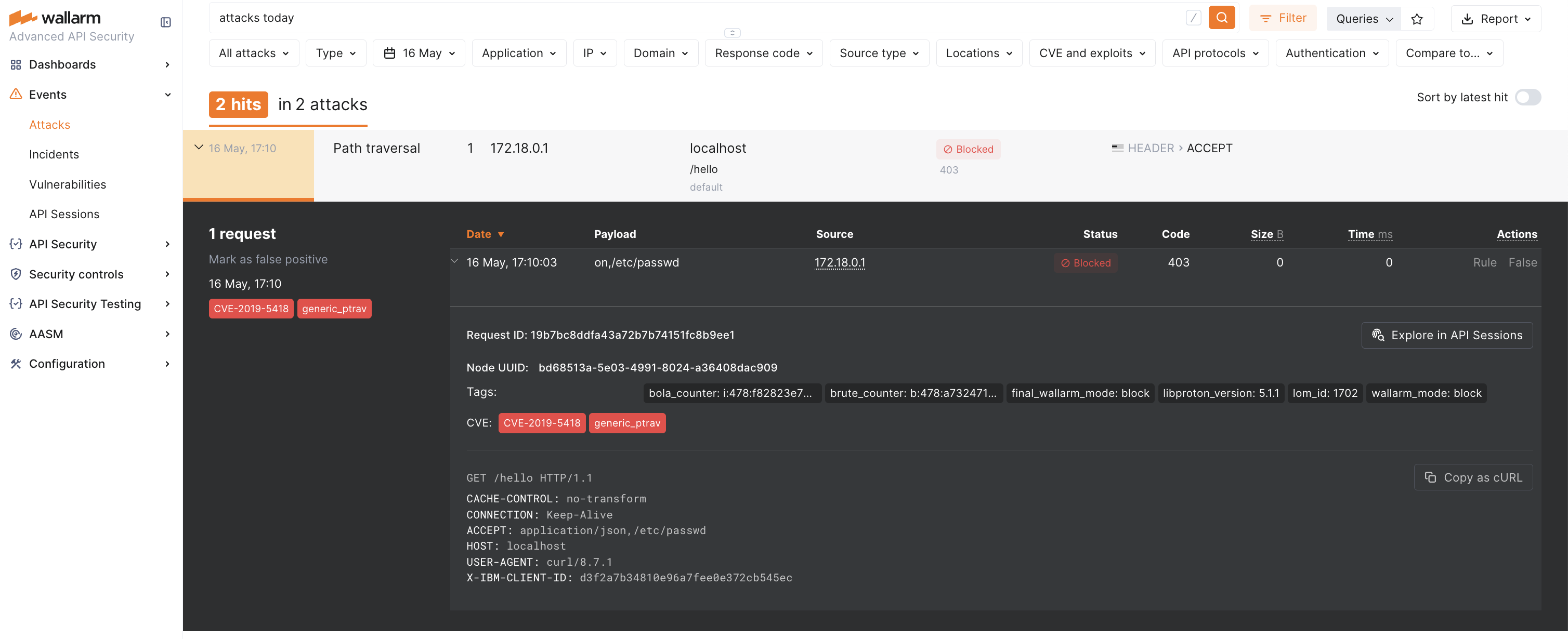
If the Wallarm node mode is set to blocking and the traffic flows in-line, the request will also be blocked (the screenshot demonstartes this case).
Upgrading the policies
To upgrade the deployed Wallarm policies to a newer version:
-
Download the updated Wallarm policies for IBM from Wallarm Console → Security Edge → Connectors → Download code bundle.
If running a self-hosted node, contact sales@wallarm.com to get the updated code bundle.
-
Re-register each policy using the
policies:createcommand and specify the updated.zipfiles: -
Repeat for
wallarm-post.zip. -
In your API specification, update the policy versions in
x-ibm-configuration.assembly.execute:... x-ibm-configuration: ... assembly: execute: - wallarm_pre: version: <NEW_VERSION> ... - wallarm_post: version: <NEW_VERSION> ...Both policies use the same version number.
-
Re-publish the associated product using the
products:publishcommand.
Policy upgrades may require a Wallarm node upgrade, especially for major version updates. See the Native Node changelog for the self-hosted Node release notes and upgrade instructions or the Edge connector upgrade procedure. Regular node updates are recommended to avoid deprecation and simplify future upgrades.